Skip to content

Mstoic

  • Home
  • Start Here!
  • Best Deals
  • Facebook Tricks
  • Privacy
  • Resources
  • TOC
  • Tools
    • Web Tools
      • Stop Watch
      • QR Code Generator
      • Adsense Code Converter
      • Blogger Sitemap Generator
      • Difference Between Two Texts
      • Vacation Checklist
      • Twitter Symbols
      • Count Down
    • Investment
      • SIP Calculator
      • Power of Compounding
      • PPF Calculator
      • FD Calculator
  • About Us

Windows 8 Start Menu Toggle – Enable / Disable Metro UI Start Screen

Editorial Team | September 16, 2011June 29, 2013 | Windows 8 |

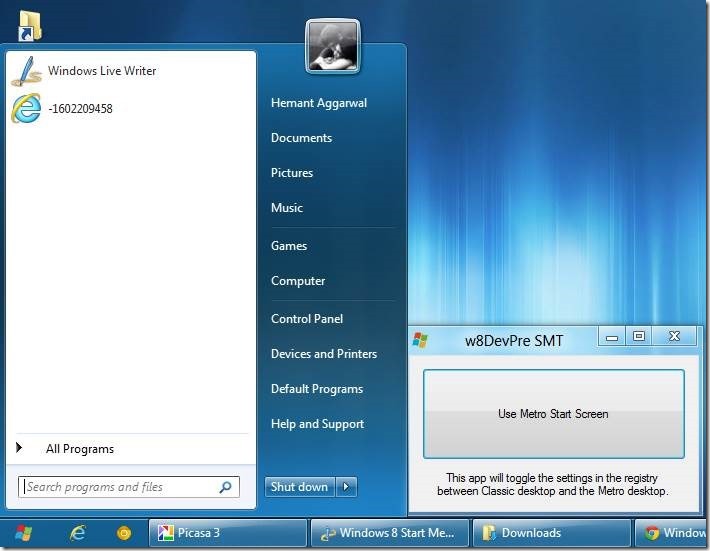
Using windows 8 ? If yes , then here’s a good news for you . If you don’t like the Start Menu Metro UI Start Screen, you can disable it  and see the Start Menu as it was in Windows 7 with just a click of a button. But this will also turn off the ribbon function and Change the Task Manager to the older version. This is just a registry edit and will not change any file. You can toggle it back anytime. So use Windows 8 Start Menu Toggle and make Windows 8 more fun.
ALSO SEE : Download Windows 8 For a 90 Days Trial For Free

Screenshot above shows the Start Menu in Windows 8 when toggled .

ALSO SEE : How To Get Windows 7 Like Control Panel In Windows 8

Download Windows 8 Start Menu Toggle

Previous Post

Install Windows 8 From USB Drive

by Editorial Team

Next Post

Free eBooks - All The Places To Search For Free eBooks

by Editorial Team

Recommended Next
Revealing Windows Hidden “Send To” Menu and Adding Items to it

Your Comment Cancel reply

Follow Us

Like us Follow us Follow us

Categories

  • Tricks (93)
  • Facebook (83)
  • Tips (76)
  • Windows (67)
  • Wordpress (39)
  • Android (38)
  • Internet (33)
  • Antivirus (30)
  • How To (29)
  • Webmasters (25)
  • Customization (25)
  • Downloads (21)
  • Utilities (21)
  • Gmail (20)
  • Windows 7 (19)

Related Articles

  • Reverse a String using StringBuilder